What is a business workspace?
Written by Mitch Crevier and Aarush Bhardwaj
Updated 12 min read
TL;DR
A business workspace connects the tools a business already runs on, such as QuickBooks, Gmail, and Google Calendar, without migrating any data. You describe the apps and automations you need in plain language, approve them, and they run on your real data. It fixes tool sprawl without replacing the tools.
A business workspace is software that connects to the tools a business already runs on, such as QuickBooks, Gmail, Google Calendar, and Excel, and builds the custom apps, automations, and reports the business needs on top of them. Nothing is migrated: every record stays in the system that owns it, and the workspace reads and acts across all of them from one place. It replaces the work of switching between disconnected tools, not the tools themselves.
That last idea is the whole category, so it is worth saying twice: you do not move your data into a business workspace. The workspace connects to what you have.
What problem does a business workspace solve?
A business workspace solves tool sprawl: the pile of disconnected software a typical small business runs on, none of which know about each other. Email in one tab, the calendar in another, QuickBooks in a third, a CRM someone half set up in 2023, and a set of spreadsheets holding everything the other tools could not.
When tools do not talk to each other, the business becomes the integration layer. A customer emails about an invoice, and somebody reads the email, opens QuickBooks to check the invoice, opens the spreadsheet to update a status, and writes the reply by hand. Every day, for years. That copying work is invisible on any budget line, and it adds up: in a Harvard Business Review study of 137 workers at three Fortune 500 companies, researchers Rohan Narayana Murty, Sandeep Dadlani, and Rajath B. Das found that people switched between apps and websites nearly 1,200 times a day and spent just under four hours a week getting back on track after those switches.
The authors named the pattern directly:
Most enterprise applications weren’t designed to connect to each other, which means that people operate in “swivel chair” roles, fetching and transforming data from multiple applications and then submitting data into other systems. A sizable part of their jobs is to act as the glue between disparate applications.
Their subjects worked at Fortune 500 companies, but the swivel chair is the same at a ten-person HVAC company. The only difference is that the person doing the gluing is usually the owner.
The cost is not only the minutes. Gloria Mark, Chancellor's Professor of Informatics at UC Irvine, has studied attention at work for two decades, and she puts it this way:
Understand that when we’re switching our attention so fast, this tank of resources that we have leaks because it requires additional effort to reorient to new tasks every time we switch.
A business workspace does not make anyone focus better. It removes the switches that exist only because the tools do not talk to each other.
How does a business workspace compare to an all-in-one suite or custom software?
A business workspace is the third answer to tool sprawl, after the two the software industry has offered for thirty years. Both older answers have real costs, and the comparison is clearest side by side:
| All-in-one suite | Custom software | Business workspace | |
|---|---|---|---|
| Getting started | Months of migration | Months of development | One sign-in per tool |
| Your existing tools | Replaced | Sometimes integrated | Kept, connected |
| Upfront cost | Migration and retraining | Tens of thousands of dollars | None |
| Fit to your process | Generic, adequate at everything | Exact, until the process changes | Exact, rebuilt in minutes when it changes |
| Who makes changes | The vendor's roadmap | Developers, billed hourly | Anyone on the team, in plain language |
The all-in-one suite dies at migration: moving years of records is months of work, the team relearns every workflow at once, and the suite's version of each tool is worse than the tool it replaced. Custom software works, and it costs heavily, takes months, and breaks the first time your process changes: in GoodFirms' 2026 survey of software development companies, about two thirds of custom projects cost $30,000 to $100,000 and took three to six months. A business workspace keeps every tool, connects them once, and builds on top.
What does "connect, don't migrate" mean?
Connecting means the business workspace signs in to each existing tool through OAuth, the same "Sign in with Google" screen you have clicked a hundred times, and from then on can read and act across that tool on your behalf. Nothing is copied out. Nothing is synced into a second database you now have to keep straight. Your accountant still opens QuickBooks and finds it exactly as they left it.
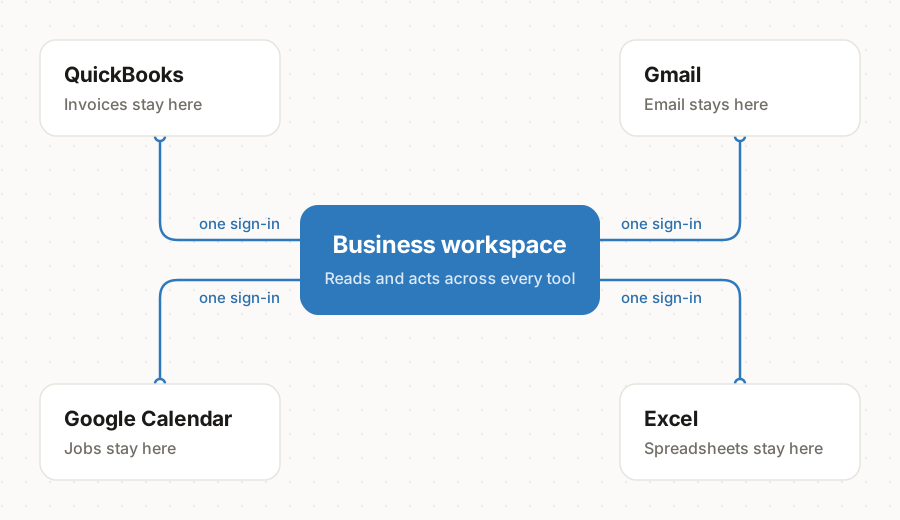
This matters because migration risk is a big reason businesses put off fixing their tooling. If trying something new means moving your data into it, trying is expensive and leaving is worse. If trying something new is a sign-in, you can start on a Tuesday afternoon.
What can you build with a business workspace?
A business workspace builds three kinds of things on top of your connected tools: apps, automations, and an agent. This is where it stops being a dashboard and starts being yours.
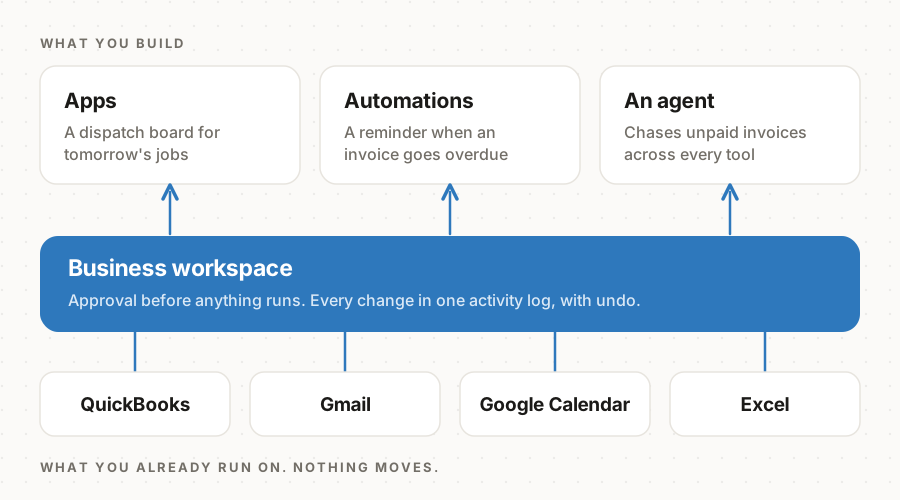
Apps. Describe the screen you wish existed and it gets built. "A dispatch board for tomorrow's jobs." "A tracker for which clients still owe us documents." A working app, on your real data, in about a minute. Not a template with your logo on it. Software shaped like your business.
Automations. The repeating work between your tools, done for you. When a form comes in, create the customer and send the welcome email. When an invoice goes two weeks overdue, draft the reminder. Set once, runs forever.
An agent. Someone on the team who can see across every connected tool. Ask it what is happening today, have it chase the unpaid invoices, let it sort the inbox every morning before you open it.
The important part is who gets to do this. Building an app used to require a developer. In a business workspace, it requires a sentence. The person who runs the process is now the person who builds the software for it: the office manager who has run dispatch for eight years builds the dispatch board.
What does a business workspace look like in practice?
In practice, a business workspace replaces the spreadsheet layer of a business: the trackers, status boards, and reminder rituals that live between the real tools. Three examples of what that looks like, each a typical small business rather than a specific customer:
- A 12-person HVAC company runs on QuickBooks, Gmail, and a whiteboard. The office manager describes a dispatch board in one sentence, and the next morning the crew checks it instead of calling in. When an invoice goes two weeks overdue, an automation drafts the reminder and the owner approves it from their inbox.
- An eight-person bookkeeping firm serves 140 clients from QuickBooks Online and a master spreadsheet only one partner understands. The firm replaces it with a client status tracker built from a description, and a missing-documents chaser that emails clients on the firm's behalf, with every outgoing message approved first.
- A landscaping business heading into spring asks for one screen showing today's jobs, yesterday's payments, and any email from a customer with a job this week. That morning dashboard is the first thing open every day, and it required no developer, no migration, and no new system for the crew to learn.
The pattern across all three: the business kept its tools, and the software that was missing got built around the process the business already had.
Is a business workspace safe?
A business workspace is safe when it is built around approval rather than access: you see what anything will touch before it runs, everything it does is recorded, and anything acting on your behalf asks first. Software that can reach your email, your books, and your calendar has to earn that reach, and a real business workspace earns it three ways:
- You see what it touches before it runs. Every app comes with a plain statement of what it looks at and what it can change, and nothing runs until you approve it.
- Everything is on the record. Every change, made by a person or by an automation at 3am, lands in one activity log, with undo next to the reversible ones.
- Asking permission is the default. An agent that wants to send an email on your behalf shows you the email first.
If a tool in this category cannot show you exactly what it is about to do to your business, it is not ready to sit above your business.
What are the pros and cons of a business workspace?
A business workspace trades a migration project for a dependency on the tools you already have. That trade is right for most small businesses, and it is worth seeing both columns before you decide:
| Advantages | Drawbacks |
|---|---|
| One place for your data. See and act across QuickBooks, Gmail, and your calendar without switching tabs. | It relies on your existing tools. If a tool is not on the connector list, or its API does not expose something, the workspace cannot reach it. |
| Nothing to migrate. Every record stays where it lives, so trying it is a sign-in, not a project. | It does not fix messy data. Duplicate customers in QuickBooks are still duplicates once connected. |
| Low cost. Free to try, then a flat monthly plan instead of a five-figure build. | Some setup time. Each tool is a separate sign-in, and each app is reviewed and approved before it runs. |
| Easy to change. When your process changes, you describe the change and the app follows. | A learning curve. Getting a good app on the first try takes practice at describing exactly what you want. |
The drawbacks are real, and they are smaller than the alternatives' drawbacks: an all-in-one suite still depends on its own integrations, and custom software still needs someone to describe what to build, at a much higher price per attempt.
Does your business need a workspace?
A business needs a workspace when its people spend more time moving information between tools than acting on it. More than a couple of these true means you are already paying for one, in hours instead of dollars:
- Somebody on your team retypes the same information into two systems every week
- The real state of the business lives in a spreadsheet only one person understands
- You have wanted a specific piece of software for years and never bought it, because nothing off the shelf matched how you work
- You pay for tools that mostly get used as a place to look things up
- "How are we doing this month?" takes twenty minutes and four tabs to answer
Every one of those is the same underlying problem: the tools do not talk to each other, so your people carry the data between them.
How much does a business workspace cost?
A business workspace costs far less than custom software. Plyxl prices by workspace rather than by person, so one plan covers the whole team. You can start on Free with no card, and move to Pro when the business runs on it. As of October 2026, the options are:
| Free | Pro | Enterprise | |
|---|---|---|---|
| Best for | Trying it on your business | A business running on it every day | Larger businesses |
| AI usage | 20,000 credits, once | 100,000 credits every month, enough for a whole team using the agent every day | More credits |
| Connected tools | Up to 3 | As many as you use | As many as you use |
| People | Up to 3 | Up to 10 | More than 10 |
| Also included | Everything in Plyxl: apps, automations, connections, the agent, docs, mail, calendar and chat | Everything in Plyxl, and help getting set up in your first month | Everything in Pro, and our team whenever you need it |
Plyxl connects to more than a hundred tools, including QuickBooks, Xero, Gmail, Outlook, Google Calendar, Shopify, Stripe, and HubSpot. The full list is under connections.
Why do business workspaces exist now?
Business workspaces exist now because AI made working software cheap to build from a description. For thirty years, small businesses chose between renting generic software and paying heavily for custom software. When an app can be built in minutes, on top of the systems you already trust, and approved before it touches anything, the sensible default flips: start with your business and shape the software around it, instead of starting with the software and bending your business to fit.
That is what a business workspace is for, and for the step-by-step version, read how to use Plyxl. Plyxl is a business workspace: connect the tools your business runs on, then build the software you need on top. Start at plyxl.com: connect what you run on, then ask for the first thing you wish existed.
Frequently asked questions
Is a business workspace the same as Notion or monday.com?
No. Notion and monday.com are destinations: you move your work into them, and their value depends on the whole team adopting them for everything. A business workspace connects to the systems where your work already lives, such as QuickBooks, Gmail, and Google Calendar, and builds on top of them without moving anything.
Is a business workspace just an integration tool like Zapier?
No. Zapier moves data between tools when a trigger fires, but it does not give you anywhere to work. A business workspace also builds the software itself: the apps, dashboards, and screens your team uses every day, running on the connected data.
How is a business workspace different from ChatGPT or Claude?
A general AI assistant answers the question you ask it, then forgets. A business workspace holds standing, approved connections to your systems, runs apps and automations continuously whether or not anyone is chatting, and keeps an audit log of every change. The assistant is a conversation; the workspace is infrastructure.
Do you need technical skills to use a business workspace?
No. You describe the app or automation you need in plain language and approve what gets built before it runs. The people best placed to build are the ones who run the process, not developers.
What does a business workspace cost?
Far less than custom software, which typically starts in the tens of thousands of dollars: GoodFirms' 2026 survey found most custom projects cost $30,000 to $100,000. Plyxl is free to start, and paid plans are priced per workspace, not per person.