Business workspace vs all-in-one software: which should a small business choose?
Written by Mitch Crevier and Aarush Bhardwaj
9 min read
TL;DR
A business workspace keeps the tools a small business already runs on and builds on top of them; an all-in-one suite replaces those tools with one vendor and requires moving everything across. The suite wins when a business has almost nothing to migrate and a small, ordinary set of needs. The workspace wins when the business already depends on QuickBooks, Gmail, or a scheduling tool, because it delivers the same one-place result without the migration project.
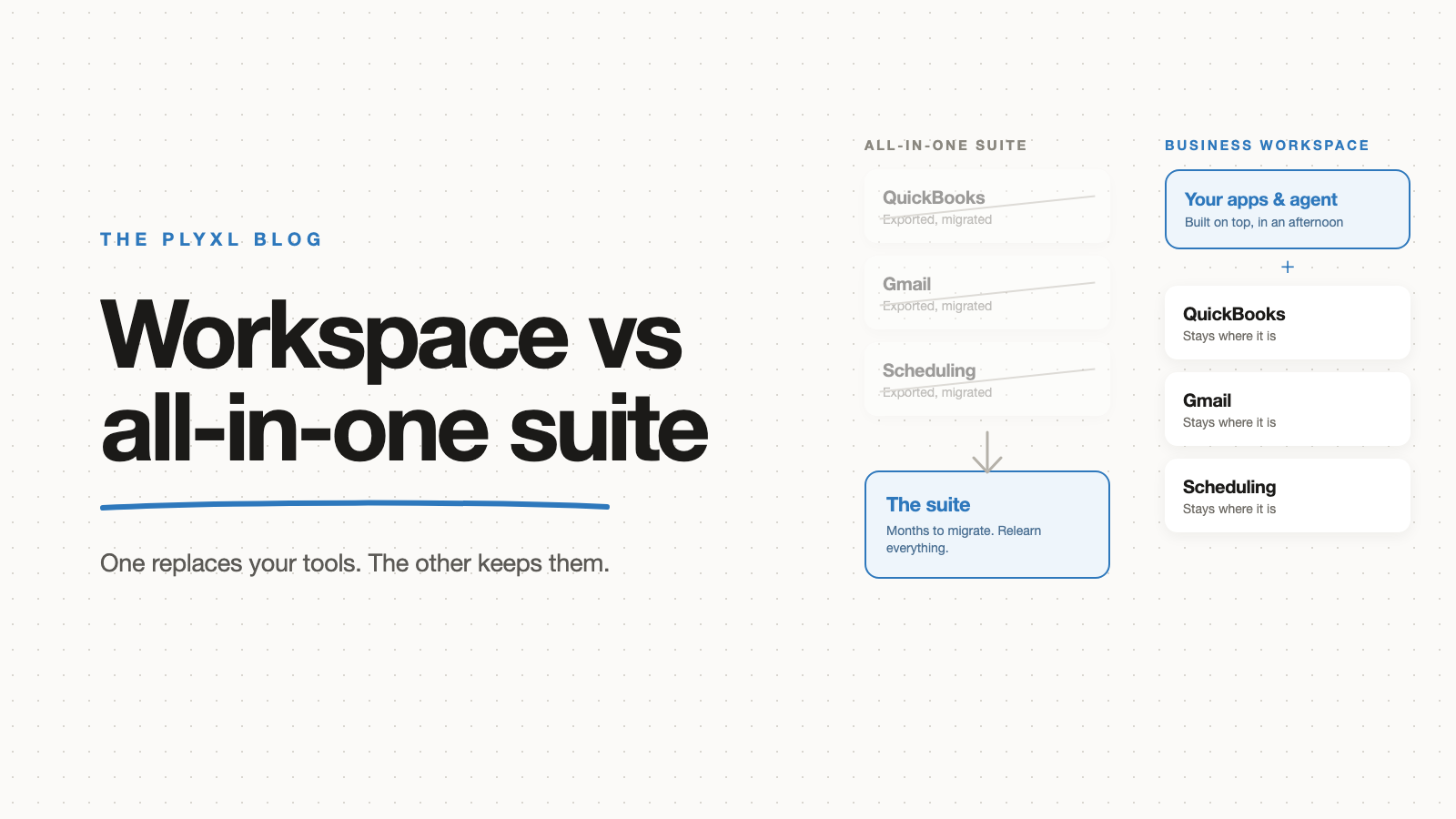
A business workspace connects the tools a small business already runs on and builds apps, automations, and an agent on top of them. An all-in-one suite replaces those tools with one vendor's versions and requires moving every record across first. Both promise one place to run the business. The difference is whether you get there by connecting or by migrating, and for most small businesses that difference decides the choice.
This post sets the two options side by side, explains why the migration matters more than the feature list, and describes the cases where each one is the right call.
What is an all-in-one business suite?
An all-in-one business suite is a single product that bundles the functions a business needs, such as CRM, invoicing, scheduling, projects, and email marketing, under one login and one bill. HubSpot, Zoho One, Odoo, and Jobber for field service are the common examples for small businesses. The promise is simple: stop juggling tools and run everything in one place.
The catch is in the word "replace". A suite works by becoming the system of record for every function it covers, which means the invoices leave QuickBooks, the contacts leave the CRM, and the jobs leave the scheduling tool. Everything the business has built up over years moves into the suite's format, and the team learns the suite's version of each job from scratch.
What is a business workspace?
A business workspace is a layer that sits on top of the tools a business already uses and gives it one place to see and act across them. The tools stay where they are. QuickBooks still holds the invoices, Gmail still holds the email, Google Calendar still holds the schedule. The workspace connects to each one through a single sign-in, and the business builds the apps, automations, and shared screens it needs on top of that connected data.
The full definition, with examples of what gets built, is in what a business workspace is. The short version for this comparison: a workspace delivers the one-place result a suite promises, without asking the business to move anything.
How do a business workspace and an all-in-one suite compare?
A business workspace and an all-in-one suite differ on almost every axis that matters to a small business: what happens to existing data, how long it takes to start, what the team has to relearn, and what happens when the product does not cover a need.
| All-in-one suite | Business workspace | |
|---|---|---|
| What happens to your existing tools | Replaced, one function at a time or all at once | Kept; connected through one sign-in each |
| What happens to your data | Exported, mapped, and imported into the suite | Stays where it lives; the workspace reads and writes it |
| Time to first useful result | Weeks to months, after migration and setup | The same afternoon, after the first connection |
| What the team relearns | Every function the suite replaced | Nothing; the tools they know stay in use |
| Quality of each function | The suite's version, usually weaker than the specialist tool | The specialist tool you chose, unchanged |
| When a need is not covered | A spreadsheet, or a bolt-on tool outside the suite | Describe the app and build it on the connected data |
| What it costs to leave | Another full migration out | Disconnect; the data was never moved |
| Best for | New businesses with nothing to migrate and ordinary needs | Businesses already running on tools they rely on |
Two rows carry most of the weight. "What happens to your data" is the migration row, and "when a need is not covered" is the row that decides whether the business ever escapes the spreadsheet layer.
Why does the migration matter more than the feature list?
The migration matters more than the feature list because it is the part of a suite move that fails, and the feature comparison rarely predicts it. A suite's feature grid looks complete on the sales page. The cost shows up in the months between signing and the day the whole team actually works in it.
The best data on this comes from the enterprise resource planning world, where suite migrations have been studied for decades. Panorama Consulting Group's 2026 ERP Report, an annual survey of organisations that have implemented a suite, found that more than a quarter exceeded their project budgets, with additional technology needs cited as the leading cause. Panorama's Chris Devault attributes that to organisations discovering misfits late in the project and then turning to added technology, expanded scope, and custom builds to close the gap. Those are companies with implementation teams and consultants. A ten-person business doing the same move has the owner and a weekend.
The mechanism is the same at every size. The suite covers eighty percent of what the business does, the last twenty percent gets discovered mid-migration, and the fix is either a bolt-on tool that recreates the sprawl the suite was meant to end, or a spreadsheet. The real cost of SaaS sprawl post walks through why that spreadsheet layer is the expensive part.
Tool count also keeps rising regardless of what a business intends. Okta's Businesses at Work 2025 report, based on the apps its customers actually connect, found the average company uses 101 apps, crossing 100 for the first time after years of flat growth. Those are Okta customers, so larger than a typical small business, but the direction is the point: businesses add tools faster than any suite can absorb them. A strategy built on replacement is always behind.
When is an all-in-one suite the right choice?
An all-in-one suite is the right choice when a business has nothing to migrate, has needs the suite covers closely, and is willing to accept the suite's version of every function. Three conditions, and all three have to hold.
The clearest case is a new business. A solo consultant setting up for the first time has no years of invoices in QuickBooks, no CRM with 400 contacts, no calendar full of recurring jobs. Adopting a suite on day one costs nothing to migrate because there is nothing yet. If the suite's CRM, invoicing, and scheduling are good enough for that business, and it never needs anything the suite does not offer, the suite is a fine answer.
The moment any of the three conditions breaks, the suite starts to cost. A business that already runs on QuickBooks has a migration. A business that needs a dispatch board the suite does not have gets a spreadsheet. A business whose accountant insists on QuickBooks for the books ends up running the suite and QuickBooks side by side, which is the sprawl it was trying to end.
When is a business workspace the right choice?
A business workspace is the right choice when a business already depends on specific tools and needs something those tools do not provide together: one place to see the state of the business, apps that fit how the business actually works, and automations across the tools rather than inside one of them.
That describes most small businesses past their first year. They chose QuickBooks or Xero because the accountant works in it. They chose Gmail because everyone already had it. They have a scheduling tool the field team is used to. None of those choices are wrong, and none of the tools talk to each other. The gap between them is filled by a person retyping and a spreadsheet nobody else understands.
A workspace fills that gap without touching the choices. Connect QuickBooks, Gmail, and the calendar through one sign-in each, then describe the client status tracker, the missing-documents chaser, or the dispatch board, and build it on the connected data in about a minute. Every action the workspace takes waits for approval, and there is an activity log with undo, so connecting is not the same as handing over control. The connections list covers QuickBooks, Xero, Gmail, Outlook, Google Calendar, Shopify, Stripe, and HubSpot.
What does the choice look like in practice?
In practice the choice turns on one question: how much does the business already have in tools it relies on? Three typical small businesses, described as archetypes rather than specific customers:
- A newly registered one-person design studio has no clients yet, no invoices, and no calendar to speak of. A suite with light CRM, invoicing, and proposals covers everything, and there is nothing to migrate. The suite is the right call today. If the studio grows to six people and adopts specialist tools, the decision gets revisited then.
- A 12-person HVAC company runs QuickBooks, Google Calendar, a field-service scheduling tool the technicians are used to, and a whiteboard for dispatch. A suite move means re-entering five years of customers and jobs, retraining the technicians, and discovering that the suite's scheduling is worse than the tool it replaced. A workspace connects the three tools in an afternoon, and the office manager describes a dispatch board that replaces the whiteboard. Nothing moves.
- An eight-person bookkeeping firm runs 140 clients on QuickBooks Online, communicates over Gmail, and tracks month-end status in a spreadsheet one partner maintains. QuickBooks is not going anywhere, so a suite would run alongside it and add a tool rather than remove one. A workspace connects QuickBooks and Gmail, and the firm builds a client status tracker and a Monday document chaser that drafts each email for approval before it sends.
In the second and third cases the suite loses before the feature comparison starts, because the migration alone is a project the business cannot afford to run.
Which should a small business choose?
A small business should choose an all-in-one suite only when it has nothing to migrate and ordinary needs, and a business workspace in every other case. The suite's appeal is real: one login, one bill, one vendor. The suite's cost is the move, and the move is where small businesses stall for years.
The practical test is a single question. If you switched tomorrow, what would have to be moved? If the answer is "nothing", a suite is worth a look. If the answer starts with "well, the invoices", the workspace gives you the same one-place result on Tuesday afternoon, with the tools you already trust still doing their jobs.
Plyxl is a business workspace: connect the tools your business runs on, then build the software you need on top. It is free to start, and there is nothing to migrate: start at plyxl.com, connect the tool where the retyping happens, and describe the first thing you wish existed.
Frequently asked questions
Is an all-in-one suite cheaper than a business workspace?
On the subscription line, sometimes. On the total bill, rarely. A suite replaces several subscriptions with one, but the migration, retraining, and the tools you keep anyway because the suite version is weaker all cost money that never appears on the invoice.
Can I use a business workspace and an all-in-one suite together?
Yes, if the suite exposes its data through an integration. A workspace treats a suite like any other connected tool, so a business that already moved to one can still build the apps and automations the suite does not include on top of it.
What happens to my data if I stop using a business workspace?
Nothing. The data never left the tools it lives in. Your invoices are still in QuickBooks and your email is still in Gmail, because a workspace reads from and writes to those systems rather than replacing them. Leaving a suite is the reverse: everything has to be exported and moved again.
When is an all-in-one suite the right choice?
When the business is new enough that there is nothing to migrate, its needs fit the suite closely, and it is willing to accept the suite version of every function. A one-person business starting from a blank slate is the clearest case.
Does a business workspace replace Zapier?
Partly. Zapier moves data between tools when a trigger fires and gives the team nowhere to work. A workspace does the moving and also gives the team the apps, the shared screens, and the agent on top. Some businesses keep specific Zaps running alongside a workspace.