Should a small business buy software or build it?
Written by Mitch Crevier and Aarush Bhardwaj
7 min read
TL;DR
A small business should buy the software that holds its core records, such as QuickBooks for the books and Gmail for email, and build the small apps that fit how it actually works on top of those tools. For thirty years building meant hiring developers, so buying almost always won. Now that software can be built from a plain-language description in a business workspace, the choice is no longer buy or build. It is buy the foundation, build the layer that makes it yours.
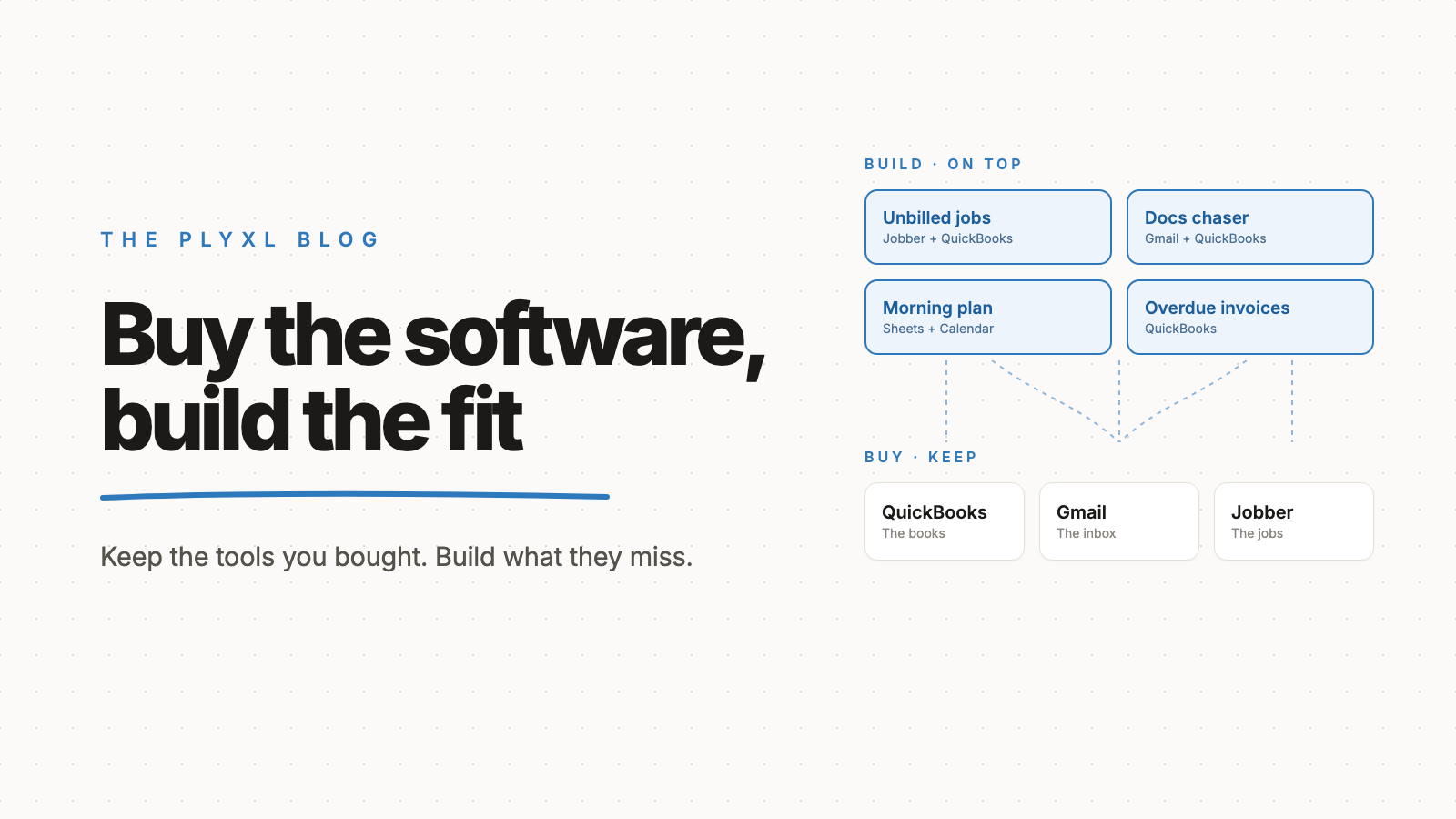
A small business should buy the software that holds its core records and build the small apps that fit how it actually works on top of that software. Buy QuickBooks, Gmail, and Square. Build the job board, the overdue-invoice chaser, and the morning summary that no off-the-shelf product gets quite right. For thirty years building meant hiring developers, so buying won by default. Now that an app can be built from a plain-language description, the question has a different answer.
This post covers why the old tradeoff existed, what changed, and how to decide which side of the line a given piece of software belongs on.
Why did small businesses always buy software instead of building it?
Small businesses bought software because building it meant hiring developers, which cost more and took longer than almost any small business could justify. In GoodFirms' 2026 survey of software development companies, about two thirds of custom projects cost $30,000 to $100,000 and took three to six months. For a 12-person company, that is a hire, not a tool.
The argument for buying is old. Fred Brooks, the computer scientist who managed IBM's System/360 software, made it in his 1986 essay No Silver Bullet, where he named buying mass-market software instead of building it as one of the most promising ways to get software at all. For decades that was simply correct. A packaged product spreads its development cost across thousands of customers, and a small business could never match that alone.
What is the hidden cost of buying software?
The hidden cost of buying software is the gap between how the product works and how the business works. Off-the-shelf software is built for the average customer, so every business fills the difference by hand: a spreadsheet beside the CRM, a weekly export from QuickBooks, a person who copies job details from email into the scheduling tool.
Each of those gaps looks small. Together they become the work. The real cost of SaaS sprawl post walks through how the retyping layer between bought tools often costs more than the subscriptions themselves. Buying more software rarely closes the gap, because the next product is also built for someone else's average.
How does buying compare with building today?
Buying, building from scratch, and building on top of bought tools are now three distinct options, and each fits a different kind of software.
| Buy off the shelf | Build from scratch | Build on top in a workspace | |
|---|---|---|---|
| Best for | Core records: books, email, payments | Software that is the product you sell | The gaps between your tools |
| Time to working | Days to sign up and set up | Months | About a minute per app, after connecting tools |
| Upfront cost | A subscription | Tens of thousands of dollars | No card needed on the Free plan |
| Fits your process | Fits the average customer | Exactly, until the process changes | Exactly, and redescribed when it changes |
| Who changes it | The vendor's roadmap | A developer, billed by the hour | Anyone on the team, in plain language |
| Where the data lives | In the product | In a database you now maintain | Stays in the tools you already use |
The third column is the one that did not exist before. It keeps the bought tools as the system of record and moves only the fit-to-process layer into something the business builds itself.
What changed so that building became realistic?
Building became realistic for small businesses when software could be built from a description instead of written by hand. In a business workspace, a person connects the tools the business already uses through each tool's own sign-in, then describes an app in a sentence: "Show every QuickBooks invoice more than 30 days overdue, with a drafted reminder for each." The app is built in about a minute, on live data, with nothing migrated.
Two things make that safe enough for a small business to rely on. First, the app reads and acts on the real tools, so there is no second copy of the books to keep straight. Second, in Plyxl every action waits for approval before it runs, and an activity log records what happened with undo. The business workspace explainer covers how connecting works in more detail.
How should a small business decide what to buy and what to build?
A small business should buy anything that holds regulated or core records and build anything that only exists to make those records fit its process. A simple test is to ask whether the software would be the same at every company in the industry. If it would, buy it. If it describes how this particular business works, build it.
- Buy: accounting (QuickBooks, Xero), email and calendar (Gmail, Outlook), payments (Stripe, Square), payroll. These are solved problems with compliance work behind them.
- Build on top: trackers, dashboards, chasers, checklists, and summaries that pull from those tools. These are the spreadsheets someone updates by hand every week.
- Build from scratch: only software that is the product the business sells, where owning every line is the point.
Most small businesses will never need the third category. The second is where the value has been hiding.
What does this look like in practice?
In practice, a business keeps every tool it bought and replaces its hand-kept spreadsheets with apps built on top. Three typical businesses, described as archetypes rather than specific customers:
- A 12-person HVAC company runs QuickBooks and Jobber and keeps a whiteboard of which finished jobs still have not been invoiced. The owner connects both tools and describes an app that lists completed jobs with no matching invoice. The whiteboard goes, and nothing about Jobber or QuickBooks changes.
- An eight-person bookkeeping firm looked at a custom client portal quote and could not justify it. Instead the firm builds a missing-documents tracker on its inbox and QuickBooks, with reminder emails drafted for staff to approve each Monday.
- A landscaping company with two crews schedules from a shared Google Sheet and texts crews each morning. The owner builds a morning summary from the sheet and the calendar, so the day's plan is ready before the trucks leave.
In each case the buy decisions stayed the same. Only the layer on top was built.
Where should a small business start?
A small business should start with the spreadsheet one person updates by hand every week, because that spreadsheet marks exactly where bought software stopped fitting. Check which tools it pulls from on the connections list, and describe the app that would replace it.
Plyxl is a business workspace: connect the tools your business runs on, then build the software you need on top. It is free to start with no card needed: start at plyxl.com, connect the tools you already bought, and build the one thing none of them do.
Frequently asked questions
Is it ever right for a small business to build its own accounting or email system?
Almost never. Accounting, payroll, email, and payments are solved problems with compliance and security work built in, so a small business should buy them and build only the layer on top.
What is the difference between building software and building on top of software?
Building software from scratch means owning the database, the hosting, and every feature. Building on top means a small app reads and acts on tools the business already pays for, such as QuickBooks or Google Sheets, so the records stay where they are.
Do I need a developer to build an app on top of my tools?
Not in a business workspace. In Plyxl a person describes the app in a sentence and it is built in about a minute, on top of the tools connected through each one's own sign-in.
What happens to the app when my process changes?
The app gets described again with the change. Because nothing was hand-coded, changing a built app is the same kind of work as building it the first time.
How much does custom software cost compared with building in a workspace?
Custom software from a development company usually costs tens of thousands of dollars; GoodFirms found most projects in its survey cost $30,000 to $100,000. Plyxl has a Free plan with no card needed, and paid plan details are on the pricing section of plyxl.com.