Why "connect, don't migrate" beats switching software
Written by Mitch Crevier and Aarush Bhardwaj
7 min read
TL;DR
For most small businesses, connecting the software they already use beats migrating to new software. A migration moves years of data, settings, and habits into a system nobody knows yet, and the business carries the risk until the cutover works. Connecting leaves QuickBooks, Gmail, and the rest in place and adds what is missing on top, so nothing is lost, nobody is retrained, and the first result arrives in days instead of months. Migration still makes sense when a tool is being shut down, cannot be connected, or is genuinely failing the business.
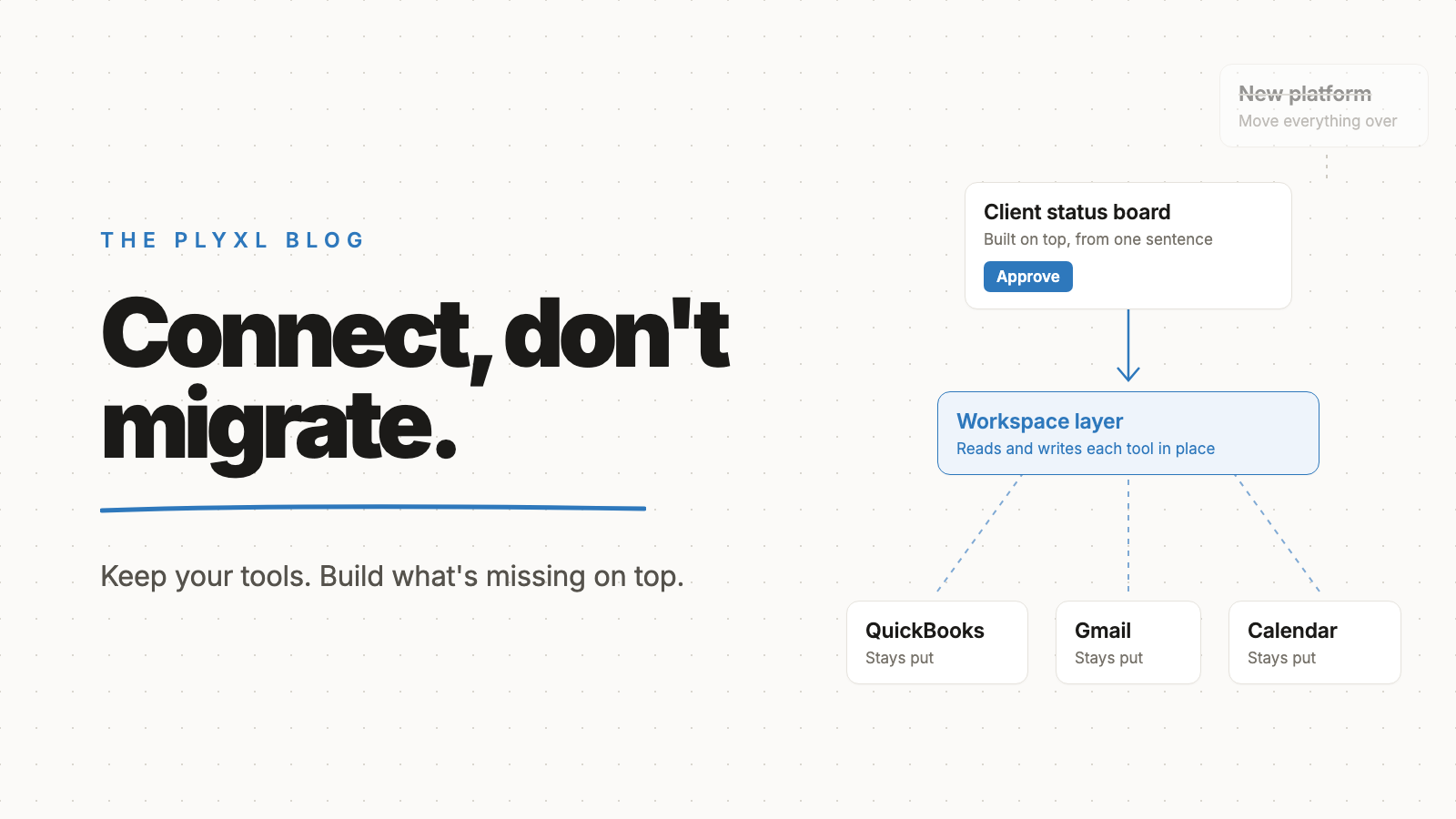
For most small businesses, connecting the software they already use beats migrating to new software. A migration moves years of data, settings, and habits into a system nobody knows yet, and the business carries the risk until the cutover works. Connecting leaves QuickBooks, Gmail, and the rest in place and adds what is missing on top, so nothing is lost and the first result arrives in days, not months.
Migration is still the right call in a few specific cases. Below is what each path actually involves, where migrations go wrong, a side-by-side comparison, and how to tell which one a business needs.
What does "connect, don't migrate" mean?
"Connect, don't migrate" means keeping the tools a business already runs on and linking them together, instead of replacing them with one new system. QuickBooks keeps the books. Gmail keeps the email. The calendar keeps the schedule. A layer on top reads from and writes to each of them, and the missing pieces get built in that layer.
The opposite approach is the migration: pick a new platform, export everything from the old tools, clean it, import it, retrain the team, and switch over on a chosen date. Migrations are what most software vendors sell, because a vendor gets paid when the business moves in.
Why do software migrations go wrong for small businesses?
Software migrations go wrong because the old system holds more knowledge than anyone wrote down. Years of small decisions live inside a working tool: the chart of accounts the bookkeeper tuned, the invoice template customers recognize, the rule that tags a certain vendor, the email filter that routes job requests. A migration has to rediscover every one of them, and the ones it misses show up as problems after the switch.
Software engineers have argued this for decades. In Things You Should Never Do, Part I, Joel Spolsky, later the co-founder of Stack Overflow, called rewriting working software from scratch "the single worst strategic mistake that any software company can make." His reasoning was that old, messy-looking code is full of fixes for real problems: "When you throw away code and start from scratch, you are throwing away all that knowledge." A small business switching systems faces the same trap with its setup and its data instead of its code.
Martin Fowler, chief scientist at Thoughtworks, makes the case from the other side in Strangler Fig Application. He describes the plan of building a replacement that does exactly what the old system did, and says his team has "seen this simple-sounding plan go down in flames most of the time." His alternative is to add new pieces on top of the old system and move work over gradually, so the investment and the returns both arrive step by step.
There is also the plain cost of disruption. During a migration, the business runs two systems, or runs one it does not yet trust. Invoices go out late, a report does not match, and the team spends weeks learning where things moved. For a ten-person company, the people doing the migration are the same people doing the work.
How does connecting compare with migrating?
Connecting keeps the risk small and the value early, while migrating concentrates both risk and value at a single cutover date. The table puts the two side by side.
| Connect what you have | Migrate to new software | |
|---|---|---|
| Data | Stays in the original tools | Exported, cleaned, and imported |
| Team habits | Unchanged; people keep their tools | Retrained on a new system |
| Time to first result | Days | After cutover, often months |
| Risk | Spread across small changes | Concentrated at the switch date |
| If it goes wrong | Disconnect; the old tools never stopped | Roll back, or live with the problems |
| Missing features | Built on top of the connected tools | Whatever the new platform offers |
| Lock-in | Low; each tool can be swapped later | High; everything lives in one vendor |
| Best for | Tools that work but do not talk to each other | Tools being shut down or failing at their job |
The business workspace vs all-in-one suite comparison goes deeper on the second column, since all-in-one software almost always requires a migration to adopt.
When is migrating to new software the right call?
Migrating to new software is the right call when a tool is being shut down, cannot be connected to anything, or is failing at its core job. Those are real reasons. "It does not do one thing we want" usually is not, because that one thing can often be built on top.
Good reasons to migrate:
- The vendor is ending the product. There is no choice; plan the move carefully.
- The tool has no way to connect. No API and no export means it cannot be part of a connected setup.
- The core job is broken. Accounting software that produces wrong numbers should be replaced, not patched around.
- The business has outgrown the tier entirely, such as a tool that cannot handle the number of locations or entities the business now runs.
Weak reasons to migrate:
- A competitor's product demo looked cleaner.
- The team wants one dashboard across several tools.
- A workflow between two tools is done by hand.
- A small feature is missing.
Every weak reason on that list is a connection problem, not a replacement problem. The SaaS sprawl post covers how to unwind a pile of tools without moving off them.
What does connecting instead of migrating look like in practice?
In practice, connecting instead of migrating means keeping the tools and adding the missing workflow in a layer on top. Three illustrative examples, each a typical business rather than a specific customer:
- An eight-person bookkeeping firm. The partners were considering moving every client into a practice management suite to get a single client status view. Instead they connected QuickBooks Online and Gmail and built a client status board on top, showing which clients still owe documents and which closes are done. The books stayed where they were, and no client had to learn a new portal.
- A 12-person HVAC company. The owner wanted a field service platform because finished jobs were not getting invoiced quickly. The jobs lived in Google Calendar and the invoices in QuickBooks. Connecting the two and adding an automation that drafts an invoice for each finished job, held for approval, fixed the actual problem without a platform switch.
- A six-person landscaping company. Customer requests arrived through a website form and got retyped into a spreadsheet. Rather than adopting a CRM and migrating the spreadsheet, the owner connected the form and Gmail and built a simple request tracker on top. The spreadsheet history stayed intact as a record.
In each case the business got the result it wanted from the migration, without the migration. More examples of first steps are in what to automate first.
How does a small business start connecting instead of migrating?
A small business starts connecting instead of migrating by writing down the one problem that made switching tempting, then checking whether connecting two existing tools solves it. Most of the time the problem is a gap between tools: information that has to be copied, a status nobody can see, a reminder nobody sends.
Then connect only the tools involved in that gap, each through its own sign-in, and build the missing piece on top. If it works, do the next gap. If a tool turns out to be genuinely broken, migrate that one tool, and the layer on top keeps the rest of the business steady while it happens. The connections list shows which tools connect today.
Plyxl is a business workspace: connect the tools your business runs on, then build the software you need on top. Each tool connects with one OAuth sign-in, apps are built from a plain description in about a minute, nothing runs without approval, and every action is recorded in an activity log with undo. The Free plan needs no card, and pricing has the details. Start at plyxl.com and connect the two tools you were about to migrate away from.
Frequently asked questions
What does "connect, don't migrate" mean?
It means keeping the software a business already runs on, like QuickBooks or Gmail, and linking those tools together with a layer on top, instead of moving all the data into a replacement system.
Is migrating to new software ever the right call?
Yes. Migration makes sense when a tool is being discontinued, cannot be connected to anything, or is failing at its core job. Being annoyed by a missing feature is usually not enough reason.
Does connecting tools mean the data gets copied somewhere else?
Not necessarily. A good connection reads from and writes to the original tool through its own sign-in, so QuickBooks stays the source of truth for the books and Gmail stays the source of truth for email.
How long does it take to connect a business tool?
Connecting a tool through its own OAuth sign-in takes about as long as logging in. A migration of the same tool is measured in weeks or months once data cleanup, testing, and training are counted.
Can a business connect now and migrate later?
Yes, and connecting first makes a later migration safer. Once workflows live in a layer on top of the tools, one tool underneath can be swapped without rebuilding everything the team uses day to day.